Ask an AI about this page
 ChatGPT
 Claude
 Perplexity
 Google AI Mode
 Microsoft Copilot
 Grok
 Mistral Le Chat
What is Mail Niaga
Mail Niaga is an email marketing platform. You keep the email addresses of your subscribers in lists. Then you send email campaigns and automatic emails to them. Signup forms help you collect new subscribers. You do all this work in the Mail Niaga console at manage.mailniaga.com.
Mail Niaga is a product of Web Impian Sdn. Bhd., a Malaysian company. The Mail Niaga website is mailniaga.com.
Who it is for
Section titled “Who it is for”Mail Niaga is for anyone who wants to contact customers or members by email at regular intervals, for example:
- Online shops and ecommerce sellers.
- Marketers and marketing agencies.
- NGOs, associations, madrasahs and tahfiz schools.
Developers can also add subscribers from other systems through the Mail Niaga API.
What you can do
Section titled “What you can do”The menu on the left of the console puts the main functions in groups: Campaigns, Audience, Sending and Integration. The Integration group has Websites and Connect AI. The API item is at the bottom, after Connect AI.
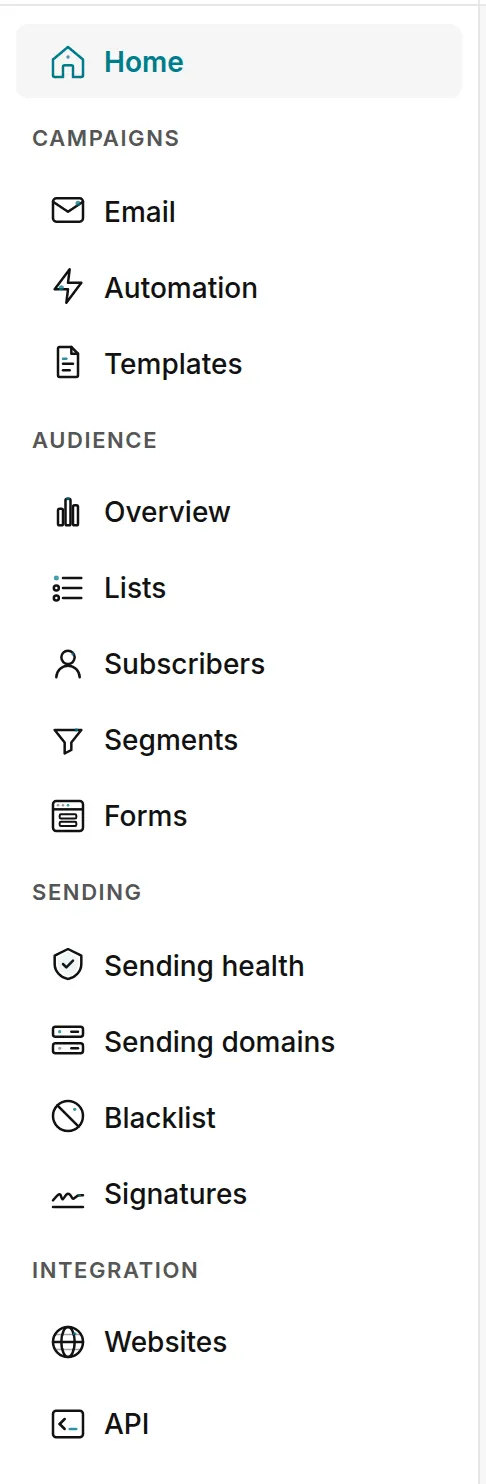
This table shows the main functions and where they are in the menu:
| Function | In the menu | Use |
|---|---|---|
| Lists and subscribers | Audience → Lists, Subscribers | Keep the email addresses of your subscribers in lists. Add subscribers one at a time or import them from a file. |
| Segments | Audience → Segments | Choose a part of the subscribers in a list with conditions that you set. |
| Forms | Audience → Forms | Signup forms for your website. Visitors can add themselves to a list. |
| Email campaigns | Campaigns → Email | Write and send an email to a list or a segment, now or at a scheduled time. |
| Templates | Campaigns → Templates | Design emails with the drag and drop editor, or use your own HTML. |
| Automations | Campaigns → Automation | Send emails automatically, for example a welcome email to a new subscriber. |
| Sending domains | Sending → Sending domains | Verify your domain. Your emails will go out in the name of your domain, and fewer of them will go to the spam folder. |
| Websites, AI and API | Integration → Websites and Connect AI, and API | Connect websites, AI assistants and other systems to Mail Niaga. |
After you log in, the Home page (the dashboard) shows a summary of your account.
How to start
Section titled “How to start”Do these steps to start with Mail Niaga:
- Register and activate your account. See Register a Mail Niaga account.
- Log in to the console. See Log in to the Mail Niaga console.
- Create your first list, then add or import subscribers.
- Create an email campaign and send it to that list.
Prices and plans
Section titled “Prices and plans”Mail Niaga uses email credits. Prices and packages can change, so this guide does not list them. See the current prices at mailniaga.com/harga.
This advice helps your first campaigns arrive:
- Verify your sending domain before your first campaign. Gmail and Outlook trust email from a verified domain more. Thus, fewer of your emails go to the spam folder.
- Send only to people who agreed to get your emails. Use a signup form to collect subscribers. Do not use a list of addresses that you bought.
Common issues
Who owns Mail Niaga?
Mail Niaga is a product of Web Impian Sdn. Bhd., a Malaysian company. The Mail Niaga website is mailniaga.com.
How much does Mail Niaga cost?
Prices and email credit packages can change. See the current prices at mailniaga.com/harga.
How do I start with Mail Niaga?
Register and activate an account in the Mail Niaga console, then log in. See Register a Mail Niaga account and Log in to the Mail Niaga console.
Was this article helpful?
Thanks for your feedback.
Sorry, this page did not help. Chat on Messenger and we will help you fix it.