
Ask an AI about this page
 ChatGPT
 Claude
 Perplexity
 Google AI Mode
 Microsoft Copilot
 Grok
 Mistral Le Chat
Put an unsubscribe link in your emails
With an unsubscribe link, a subscriber can stop your emails with one click. Each campaign email must have this link. In Mail Niaga, this link is the tag {{ UNSUBSCRIBE_URL }}.
Why the unsubscribe link is important
Section titled “Why the unsubscribe link is important”If recipients cannot find a way to unsubscribe, many of them will click the spam button. Spam complaints damage your sending reputation. Then Gmail, Yahoo and other providers start to put your emails in the spam folder. Anti-spam laws (for example CAN-SPAM) also make an unsubscribe link necessary in marketing emails.
Put the link in the email builder
Section titled “Put the link in the email builder”Some gallery designs, for example Make an announcement, already have an “unsubscribe” link at the bottom. If your design does not have this link, make a text into a link, with the tag as the URL.
- Write a text such as “Unsubscribe” at the bottom of the email.
- Double-click the text, then select the text.
- Click the Link button on the text toolbar (Ctrl+K).
- In URL, type
{{UNSUBSCRIBE_URL}}. - Click Apply, then click Save.
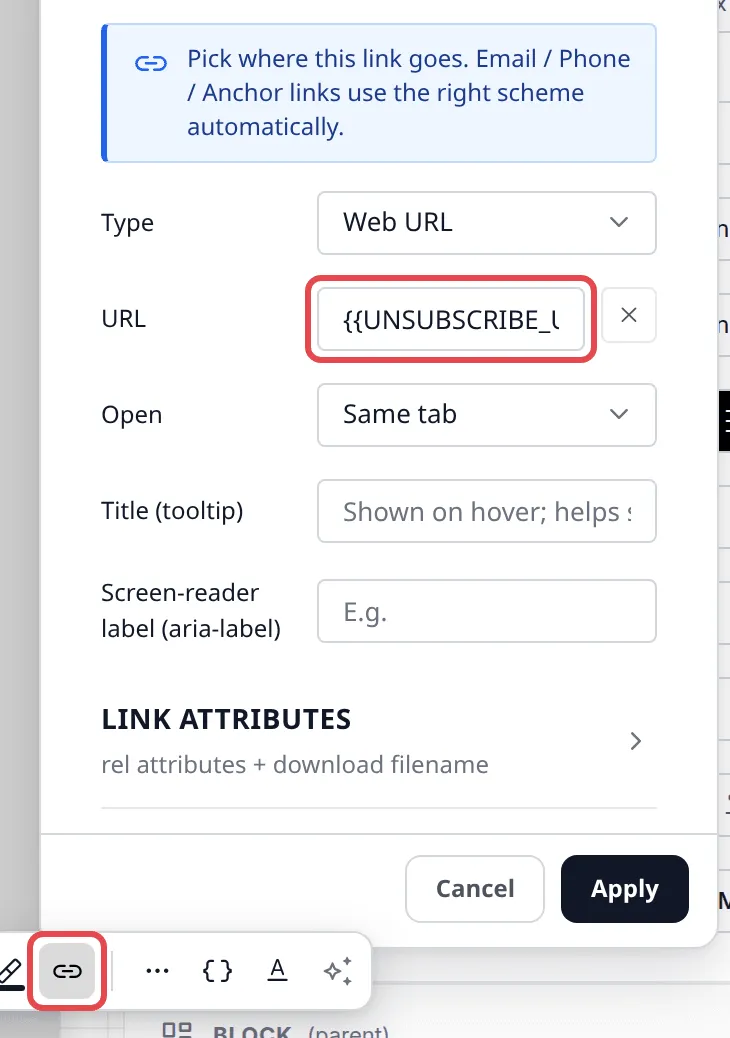
For a Button or Image block, click the block. On the panel, click the { } button (Insert variable) next to the URL field, then choose Unsubscribe link.
Do not use the { } button on the text toolbar for links. That button puts the tag in as plain text, not as a link.
Put the link in Custom HTML
Section titled “Put the link in Custom HTML”In the Custom HTML editor, make a text into a link, with the tag as the URL.
- Select the text “Unsubscribe” in the editor.
- Click the link button (Insert/edit link) on the toolbar.
- In URL, type
{{ UNSUBSCRIBE_URL }}. - Click Save in the popup, then click Save HTML.
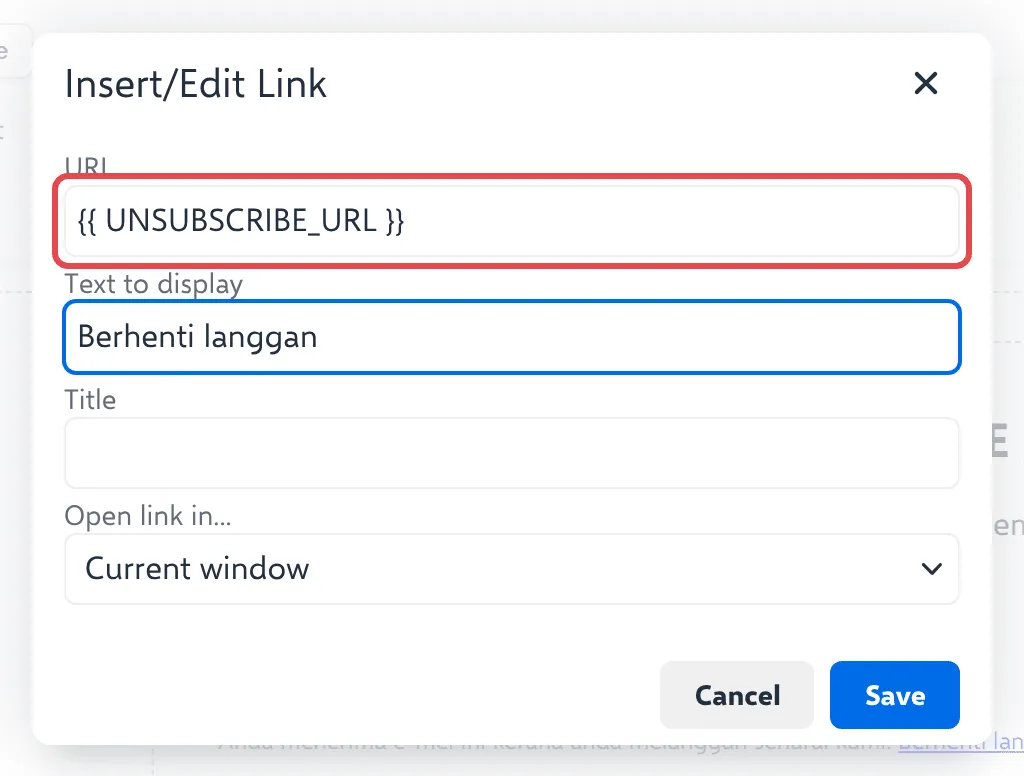
If you write your own HTML in source mode (Edit Source in a campaign, Edit source in a template), use <a href="{{ UNSUBSCRIBE_URL }}">Unsubscribe</a>.
The check before the campaign is sent
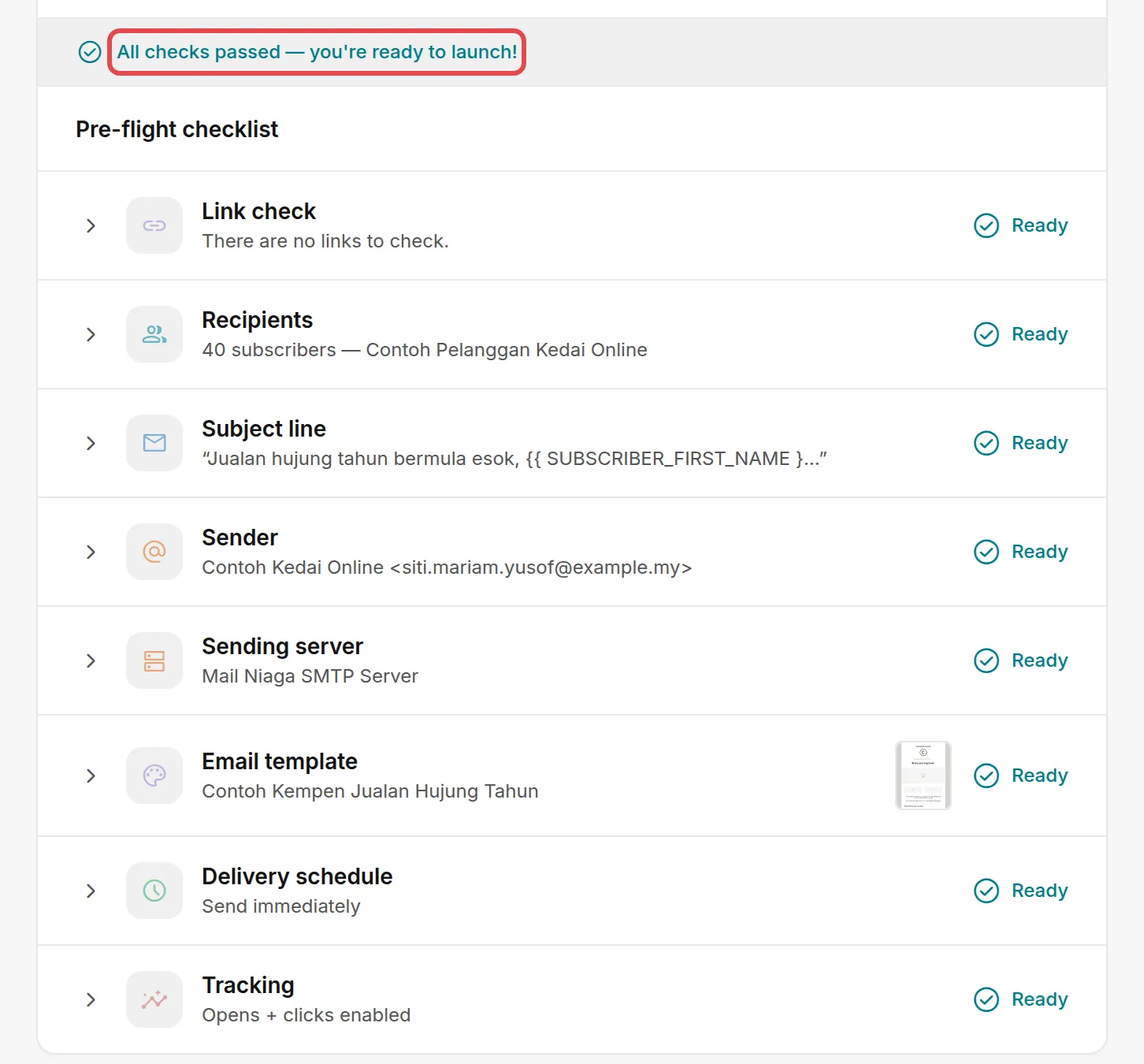
Section titled “The check before the campaign is sent”In the Confirm step, Mail Niaga checks your email in the Pre-flight checklist. If the unsubscribe link is not there, the list shows “Missing unsubscribe link”.
For some plans, Mail Niaga makes this link mandatory. Then the row has the mark Needs attention, and you cannot launch the campaign until you put in the link. For other plans, the row has the mark Review. You can still launch the campaign, but we recommend that you put in the link.
If all is correct, you see “All checks passed”.
What the subscriber sees
Section titled “What the subscriber sees”When a subscriber clicks the link, the “Confirm unsubscribe” page opens with the email address of that subscriber. After the subscriber clicks Yes, unsubscribe me, Mail Niaga changes the status to Unsubscribed. A click on the link alone does not change the status of the subscriber. Because of this, the link scanners in email applications do not unsubscribe a subscriber by accident.
This page is a system page. Changes to the Unsubscribe form in the Forms / Pages of your list do not show on this page. See Unsubscribe page and goodbye email.
This advice helps you make the unsubscribe link work for your readers:
- Put the link where readers can see it. Readers usually look for it at the bottom of the email.
- Click the link in your test email. Make sure that the link opens the unsubscribe form, not an error page.
Common issues
What must I do if "Missing unsubscribe link" shows in the Confirm step?
Your email does not have the {{ UNSUBSCRIBE_URL }} tag. Go back to the Template step, put in the unsubscribe link and save. Then open Confirm again.
Why does the link not work when I write {{ Unsubscribe_Url }}?
The tag must be exact: {{ UNSUBSCRIBE_URL }} (capital letters) or {{ unsubscribe_url }} (small letters). A mix of capital and small letters does not work.
Was this article helpful?
Thanks for your feedback.
Sorry, this page did not help. Chat on Messenger and we will help you fix it.